
Research update!
Next week will be my “midterm” review in which I have to make a small presentation about what I’ve done in front of my lab members, so I will use this as a way to compile my thoughts for me to use later.
As I stated in the first post, my research will be to use computer vision and a mechanical arm to detect, track, and interact with some object in our 3D world. Since it’s week 4 and I already have the thing almost done, my professor has told me about the second part of this project — to use what I have done to create a virtual game of chess. This includes displaying an augmented reality view of chess pieces on a chess board. A brief summary of what I need to do is written below.
Research Part 1:
- Use Arduino Braccio robot arm and a USB mini webcam to find and track objects
- Objects: blue ball, water bottle cap
- Used libraries:
- C++
- OpenCV: Open source computer vision software
Research Part 2:
- Incorporate detection of Augmented Reality markers
- Use movement of arm to pick up objects
- Project 3D Objects over ArUco markers
- Use OpenGL to draw
- Used libraries:
- OpenGL: Open source graphics API
- ArUco: a minimal library for Augmented Reality applications
The parts I am using for Part 1 of this project is an Arduino Uno microcontroller board, a Arduino Braccio mechanical arm, and a mini camera.


Using camera filtering techniques and OpenCV’s object detection functions, I first tried to use this setup to detect a blue colored bottle cap. I change the color spectrum of the image feed by converting the RGB feed to an HSV feed. HSV stands for Hue-Saturation-Value and is a representation of an image using only those three factors. This allows for easier manipulation of image data when it comes to image processing. I then apply a threshold on the HSV values of the image, filtering out anything not related to the blue threshold I wanted, which in my case had about a hue threshold of 120 ~ 140, saturation threshold of 100 – 255, and a value threshold of about 100 – 255. The resulting image post-threshold is the one of the top right. You can see the bottle cap is now highlighted as a white circular object. Using OpenCV, I then find the largest detected contour and extract its enclosed circle in the image. The final image is the one on the bottom left.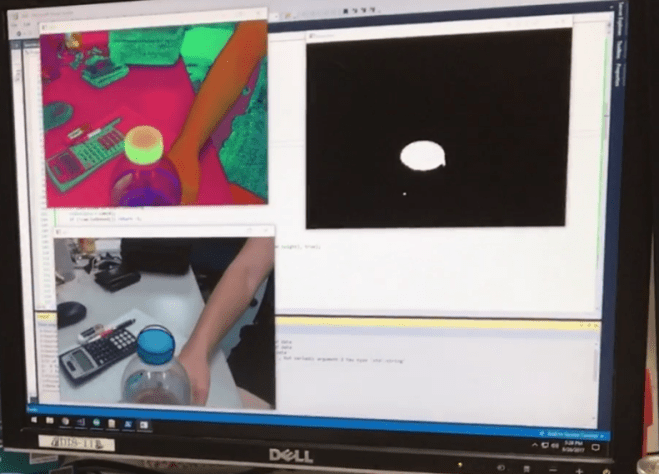
Now that I got the basic functionality of detecting random objects down, I can proceed to figuring out how to program the arm to track the object. I needed a way to move the arm in real time, so I added a component to my program that would send packets of information through my computer’s serial port to the Braccio’s serial port. The packets had the following format where m1 is motor 1, m2 is motor 2, etc:
-
-
- degrees_m1 + m1 + degrees_m2 + m2 + … + z
-
where the character ‘z’ represented the terminating character to let the Braccio know that is the end of the packet. The Braccio has 5 servos controlling different parts of the arm and are named the base, shoulder, elbow, wrist, and rotation of wrist. Using those names, I gave each of them a letter representation:
| Motor |
Char Value |
|
Base |
b |
|
Shoulders |
s |
|
Elbow |
e |
|
Wrist |
w |
| Wrist Rotation |
v |
So for example, if I wanted to rotate the base 180 degrees, bend the elbow 100 degrees, and open the wrist 90 degrees, I would send the packet, “180b100e90wz”.
The following video shows it all in action:
This pretty much sums up what I have done within the last 4 weeks… Typing it out now makes it seem like it isn’t a lot of things, but it definitely felt like I did a lot. I came into this project without any knowledge of what OpenCV was. I have never even written a program in C++ before (but learning this part was relatively simple). Also, I have never programmed using a Arduino before, so there was definitely a large learning curve I needed to go through before getting to this point. I hope that I can keep up my progress and finish part 2 of the project! Wish me luck! がんばる!
 Michael Tang